Introduction
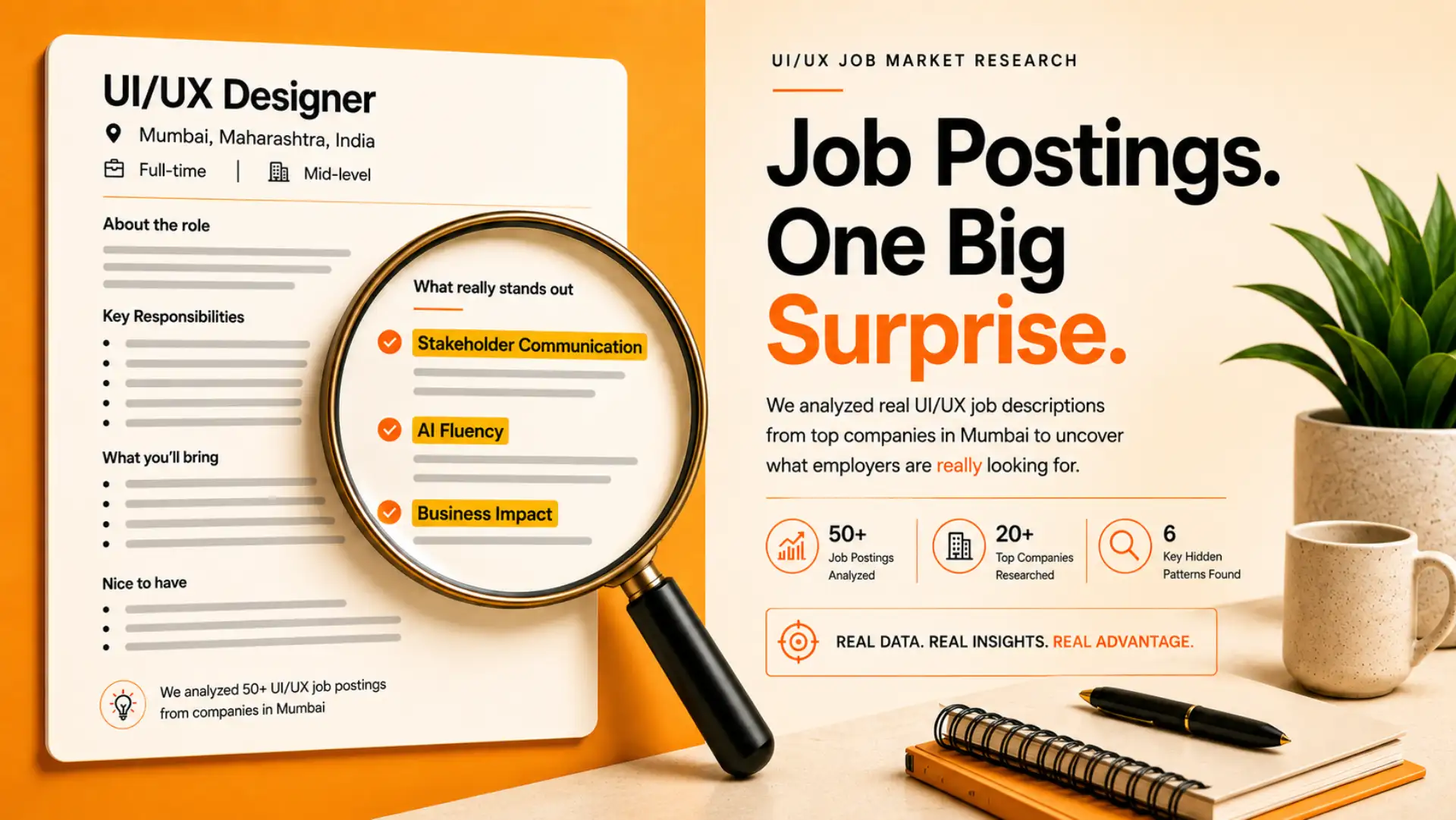
We dug into real UI UX jobs descriptions from companies in Mumbai to understand what employers are actually looking for in a UI/UX designer. Beyond the standard “learn Figma, build a portfolio” advice, most students are preparing for the job they think exists, the one their curriculum and YouTube tutorials trained them for, instead of the job that’s actually being advertised.
We went straight to the source and cut the fluff. The real divide wasn’t in technology. It was in understanding.
1. How We Reviewed These Postings
We reviewed 100+ entry to mid-level UI UX jobs postings sourced from LinkedIn Jobs and Naukri, reading complete job descriptions rather than relying only on job titles. Although the titles varied – UI/UX Designer, UX Designer, Product Designer, UX Associate, and Product Design Executive – the skills and expectations listed underneath were remarkably consistent. The postings represented a diverse mix of fintech companies, SaaS businesses, digital agencies, product startups, EdTech platforms, and e-commerce brands hiring across Mumbai.
Instead of simply counting how often tools like Figma or Adobe XD appeared, we focused on identifying recurring hiring patterns. We compared responsibilities, required skills, preferred qualifications, and portfolio expectations to understand what employers consistently value. This approach helped us uncover the practical skills and qualities that separate average candidates from those who stand out during the hiring process.
2. The Baseline: What Every Posting Required
Before looking at the advanced skills employers expect, it’s important to understand the common requirements that appear in almost every UI UX Jobs listing. Regardless of the company, industry, or job title, we found a core set of technical and practical skills that every candidate is expected to have. These requirements form the baseline for UI UX Jobs in Mumbai, meaning they help you qualify for a role but are rarely enough on their own to stand out during the hiring process.
- Figma proficiency.
- Beginner-level wireframing and prototyping.
- Basic user research and usability testing.
- A portfolio link was a dealbreaker even before an interview was considered.
- Basic knowledge of design handoff to developers (specs, components, design system principles)
- Experience designing within an existing brand or design system.
This was the baseline, and every course already teaches it. No posting skipped this list, and no posting treated it as sufficient on its own.
3. The Surprise: What Courses Don’t Teach
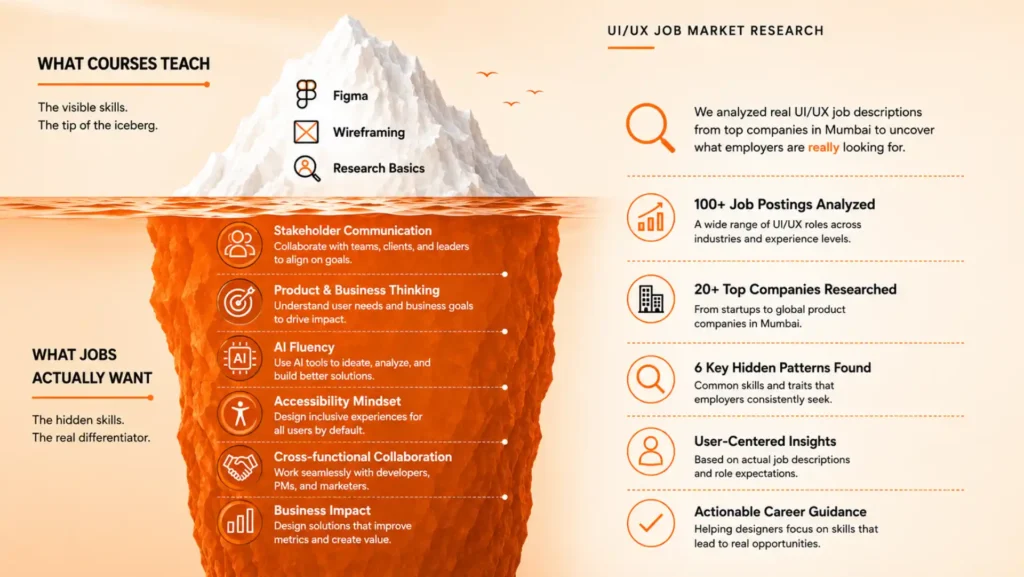
Beyond the basics, every posting expected candidates to think like product people, not just screen designers. Demand for UX talent remains strong, but the designers getting hired in 2026 are the ones combining core UX skills with AI literacy and product thinking.
The recurring gaps across postings:
- Stakeholder communication — the ability to justify a design decision to non-designers or cross-functional teams.
- Business and product thinking — connecting design choices to outcomes like conversion, retention, or drop-off, not just visual polish.
- Accessibility basics — several postings explicitly referenced accessibility standards such as WCAG guidelines, an area rarely covered at the beginner level.
- AI-assisted workflow fluency — using AI tools to speed up output without losing design judgment.
- Cross-functional collaboration — attending product or engineering discussions, not just delivering a finished file.
None of these skills are advanced. They’re simply the skills designers develop when working on real products instead of classroom exercises.
4. AI Tools: What Postings Actually Asked For
One of the biggest misconceptions about UI UX Jobs is that companies are looking for AI experts. Our research found the opposite. Employers are not hiring designers to let AI make design decisions—they are hiring designers who know how to use AI to work smarter, faster, and more efficiently without compromising the user experience.
Across the UI UX Jobs we reviewed, AI was consistently mentioned as a productivity tool rather than a replacement for design thinking. Companies expect designers to understand the UX process first and then use AI to reduce repetitive work, organize research, generate ideas, and improve collaboration. The focus remains on human decision-making, creativity, and problem-solving.
The AI Tools Most Frequently Mentioned
| AI Tool | How Employers Expect Designers to Use It |
| Figma AI | Generate UI variations, speed up wireframing, automate repetitive design tasks, and explore multiple layouts quickly. |
| ChatGPT / Claude | Summarize user interviews, draft UX copy, brainstorm user flows, create personas, and structure research findings. |
| Notion AI | Organize design documentation, meeting notes, research insights, and project requirements. |
| Dovetail | Analyze user interviews, identify recurring patterns, and convert qualitative research into actionable insights. |
The phrase “experience with AI tools” appeared in several UI UX Jobs, but the expectation was remarkably consistent. Employers weren’t asking candidates to rely on AI for creativity or critical thinking. Instead, they wanted designers who could integrate AI into their existing workflow while maintaining control over every design decision.
For example, AI can generate multiple layout ideas in seconds, but it’s still the designer’s responsibility to choose the best solution based on user research, accessibility guidelines, business goals, and usability principles. Similarly, AI can summarize interview transcripts, but interpreting user pain points and translating them into meaningful design improvements remains a human skill.
Key Takeaway: Learning AI tools can improve your productivity, but they won’t replace the fundamentals. Employers continue to prioritize designers who can conduct user research, justify design decisions, collaborate with stakeholders, and solve real user problems. AI simply helps those designers work more efficiently.
5. Salary Snapshot
| UI/UX Career Level | Experience | Average Annual Salary (Mumbai) | Typical Salary Range | What Employers Expect |
| UI/UX Design Intern | 0–6 Months | ₹1.8 – ₹3.0 LPA | ₹1.2 – ₹3.5 LPA | Basic Figma skills, wireframing, eagerness to learn, design fundamentals |
| Junior UI/UX Designer | 0–2 Years | ₹4.0 LPA | ₹3.5 – ₹5.5 LPA | Strong portfolio, UI design, basic UX process, prototyping, collaboration |
| UI/UX Designer | 2–4 Years | ₹5.9 LPA | ₹4.5 – ₹7.5 LPA | User research, design systems, usability testing, end-to-end product design |
| Senior UI/UX Designer | 4–7 Years | ₹9.5 LPA | ₹7.5 – ₹13 LPA | Leading projects, mentoring, complex UX, stakeholder communication |
| Lead UI/UX Designer | 7–10 Years | ₹15 LPA | ₹12 – ₹20 LPA | Team leadership, product strategy, design operations, cross-functional collaboration |
| UX Manager / Design Manager | 10+ Years | ₹22 LPA | ₹18 – ₹35 LPA+ | Managing design teams, business strategy, product vision, organizational leadership |
Portfolio Impact on Salary
| Portfolio Quality | Expected Salary Impact |
| Only UI Screens / Dribbble-style Designs | Usually falls in the lower salary range |
| Includes UX Case Studies & Problem Solving | Can increase salary by 20–40% over comparable candidates |
| Real Client Projects / Internships | Higher interview shortlist rate and better salary negotiations |
| Live Products with Measurable Results | Often considered for higher-paying product companies |
Note: Salary figures are based on publicly available estimates from platforms such as Glassdoor and AmbitionBox for the Mumbai market. Actual salaries vary depending on company, location, portfolio quality, technical skills, and interview performance.
6. Why Portfolios Get Rejected
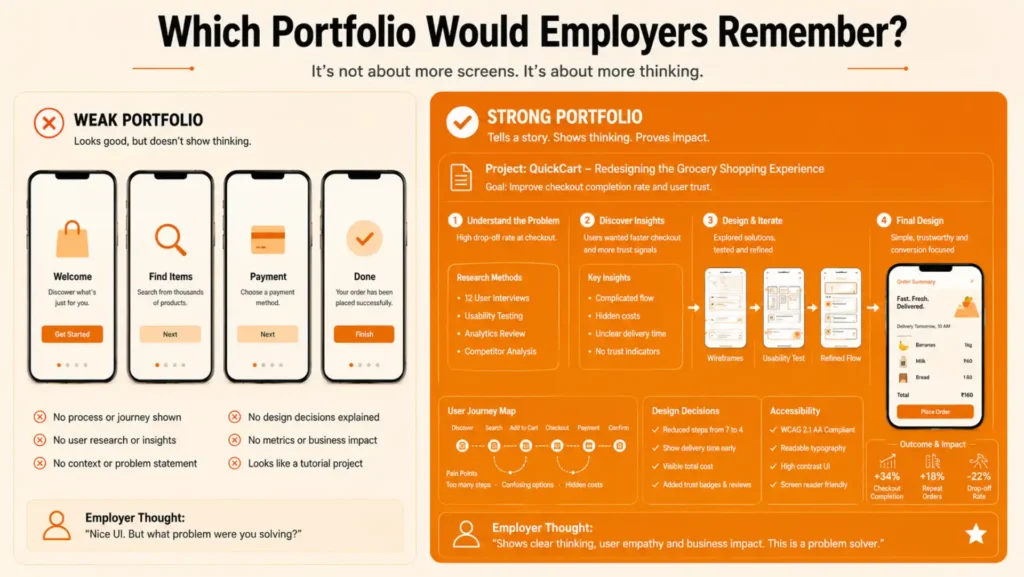
Most rejections happened before an interview was even considered. Portfolios increasingly look the same because candidates optimize for visual polish over problem-solving. The most common reasons cited by interviewers:
- No story — polished screens with no explanation of the problem solved or the decision behind it.
- No visible process — missing sketches, iterations, or user feedback showing how the design was reached.
- Templated case studies — a copy-paste Problem-Solution-Result structure with no real detail about the product or users.
- No business context — no measurable outcome mentioned, such as engagement, drop-off, or conversion impact.
- One-note portfolios — the same type of problem solved across every project, with no sense of range.
- No evidence of user validation — no indication the design was tested with real users before being finalized.
What candidates submit as a portfolio is only the smallest, least convincing part of the actual work.
7. What This Means for Your Career
This isn’t a talent gap; it’s an exposure gap. Most beginners learn the tools but not the strategic thinking that makes a designer hireable. Closing that gap means working on real projects, making real decisions, and being able to explain the reasoning behind them, not just following a brief. Organizations like the Nielsen Norman Group have long emphasized that strong UX work is judged by process and reasoning, not just final visuals, and hiring managers are clearly applying the same standard.
Le Mark Institute’s Graphic Design & UI/UX diploma courses are built to close exactly this gap, with live projects and mentored feedback that help students graduate with case studies showing their process and outcomes, not just finished screens.
FAQ
No. While competition is high, the market isn’t saturated with skilled designers. Portfolios that showcase real problem-solving and UX thinking stand out more than visually appealing screens alone.
No. Most employers value a strong portfolio, practical skills, and real projects more than a traditional degree. Diploma and certificate courses are widely accepted.
Start with UX fundamentals like user research, wireframing, and usability, then learn tools such as Figma. Understanding users is more important than mastering software.
A beginner can usually build a strong portfolio with 2–4 case studies in 3–4 months through consistent learning and hands-on projects.
No. AI can speed up design tasks, but it cannot replace user research, strategic thinking, or solving real user problems. Designers who use AI effectively will have an advantage.
Companies look for skills in user research, wireframing, prototyping, Figma, usability testing, design systems, and the ability to explain design decisions.
Yes. A strong portfolio, internships, freelance work, and practical projects can help freshers secure UI/UX roles even without full-time experience.
Yes. With growing demand across startups, product companies, and digital businesses, UI/UX design remains a promising and high-growth career in India.
Conclusion
Every screen in your portfolio should answer three questions: What problem existed? Why did you make this decision? What changed because of it? Candidates who can answer those questions consistently are the ones employers remember.
That’s really the entire finding from these postings. Companies in Mumbai aren’t hiring the best-looking portfolio; they’re hiring the designer who can think clearly under a real brief, defend a decision in a room full of non-designers, and connect their work to something the business actually cares about. Figma skills get your resume past the first filter. Everything after that comes down to how well you can explain your thinking.